

Trustworthy website browser
Mozilla Firefox is a free cross-platform website browser that is available on Android, Apple iOS, Mac, Linux, and Microsoft Windows devices. The open-source software comes with a multitude of benefits that make the platform highly recommendable. It is lightweight, fast, and secure. Within the clean user interface, users can customize add-ons, privacy settings, search engine, etc.
Is Mozilla Firefox safe to download?
The development of Firefox is funded by not-for-profit organization Mozilla Foundation. This community of developers continues to build the web browser based on principles set forth within the Mozilla Manifesto. The Mozilla Corporation gave this statement to the public during the early years of them pioneering the internet movement. The Manifesto highlights fundamental privacy standards, transparent operations, a balance between profit and public benefit, etc.
As a company that believes in free speech and privacy, Mozilla has created the safest privacy browser for people to use. You can download the browser to enhance privacy protection standards. The company goes beyond simply sending a privacy notice to users who encounter malicious web pages. The Firefox privacy standards include the ability to ‘Enable DNS over HTTPS’, block trackers, etc.
What does Firefox do?
To connect to the internet, individuals need to install and launch a web browser. Once the browser is open, users can access their search engines to surf the world wide web. Mozilla Firefox puts an immense emphasis on security. This important focus is relevant today as the immersive web is becoming more advanced and expansive online.
The Firefox menu is in the upper left corner of the Mac desktop screen. You just need to select ‘Firefox’ and click on ‘Preferences’ to customize the settings. You can easily access specific preferences by sifting through the categories within the left panel: ‘General’, ‘Home’, ‘Search’, ‘Privacy & Security’, and ‘Sync’. People can make Firefox their default browser in the ‘General’ segment.
Another important aspect that is accessible in the ‘General’ section is at the bottom of the screen in ‘Network Settings’. By clicking on the ‘Settings’ button, individuals can select the DNS over HTTPS option to provide additional web surfing privacy. The ‘Home’ tab within ‘Preferences’ is where users can customize their home screen.
Under the ‘Firefox Home Content’ section, you can deselect and select many content options that appear in the home window: the web search bar, top sites visited, recommendations, saved media, etc. People can tailor their browsing experience to include all of the features, some of them, or none.
The Firefox community can customize their bookmarks and tool bar by right-clicking on the icons and pressing ‘Remove from Toolbar’. The ‘Search’ area of ‘Preferences’ lets users easily choose their default search engine from a list of options: Bing, Google, DuckDuckGo, etc. In this area, people can choose how suggestions from the search engine appear.
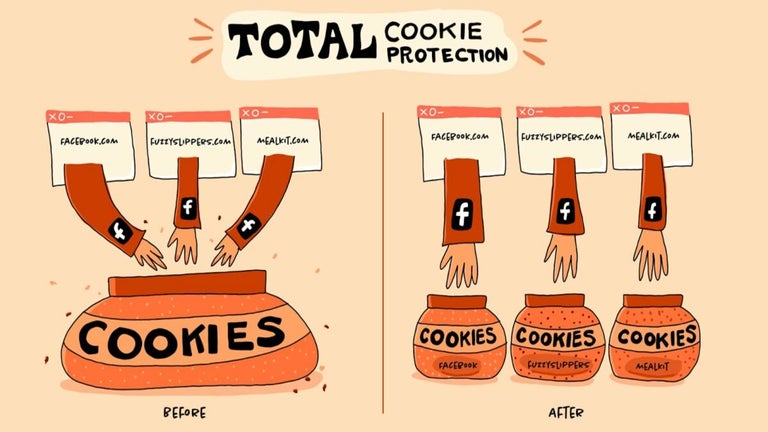
Within the ‘Privacy & Security’ segment, you can choose the level of protection that you want for your data. These range from standard, strict, and custom policies that can block cookies, tracking content, cryptominers, and fingerprints. If users want to send a ‘Do Not Track’ signal to every website, then they can mark ‘Always’. Cookie, login, and password preferences are located at the bottom of the page.
Releases Firefox has made
Mozilla conveniently integrates the programs that the team develops into the Firefox browser to enhance the user experience. Pocket is a built-in application that lets people quickly save website content that they are viewing in an easily accessible place. These stored items are synched across the devices that are associated with the particular Firefox account; easily transfer them from the Android browser to the Mac.
Firefox Lockwise is another natively built-in app. While this password manager is secure, other password management software options can integrate into the Firefox freeware and provide more advanced features. Along with being at the forefront of the technological movement of the internet’s integration into society, Mozilla has become a trailblazer within the virtual reality realm with the new Firefox Reality platform.
The VR app is a hub for experiencing 2D and 3D sensatory experiences. With the Mixed Reality program, you can become virtual reality creators and play VR games. Mozilla gives additional power to the people with the release of their Developer Edition software that is specifically designed for web developers. Within the Developer Edition, beta versions are available for the developer tools.
Mozilla launched a trustworthy VPN extension that can easily be turned on and off. With Fire TV, people can find and watch movies, series, etc. To search the web securely and quickly, use the Firefox Nightly browser that is updated every day by the Mozilla team.
Alternative desktop browsers
Brave Browser, DuckDuckGo, Google Chrome, Microsoft Edge, Internet Explorer, Opera, Avast Secure Browser, and Safari are comparable applications. Brave, Chrome, Edge, Internet Explorer, Opera, and Safari are web browsers, while DuckDuckGo is a search engine. Compared to the aforementioned web apps, the browsing mode in Mozilla Firefox is the lightest, quickest, and most secure option. The ‘Privacy & Security’ settings within Firefox are more advanced compared to other web browsers.
The user interfaces within the programs are similar; aesthetics are simple and clean. The home screens of the apps include top sites, search bars, etc. The dedication to quality that Mozilla has provided to society is a deciding factor in downloading Firefox. Companies like Google and Microsoft can learn from the transparent commitment that Mozilla embodies.
A healthy internet browsing experience
Putting the safety of humanity at the forefront of their products, Mozilla has created a trustworthy web browser that emphasizes security, speed, and storage space. The open-source freeware lets users sign in with personal accounts and is available in different languages: English, Italian, etc.
What’s new?
By performing daily software updates, Mozilla is dedicated to providing quality products. When you download the Firefox browser, you receive a multitude of incredible innovations that the company has created: Pocket, Lockwise, etc.
We also recommend you to read:
Enhanced Picture-in-Picture Experience in Firefox 113.0
The latest Firefox update, version 113.0, introduces a significant improvement to the Picture-in-Picture feature. Users can now rewind, check video duration, and switch to full-screen mode with ease on the most popular video websites. This enhancement provides a smoother and more enjoyable video-watching experience within the browser.
Improved Address Bar Search Functionality
Firefox's address bar has long been a convenient search tool, and with the latest update, it becomes even more user-friendly. Now, users can see their search terms and refine them while viewing the results without any additional scrolling. Additionally, a new result menu makes it easier to remove history results and dismiss sponsored Firefox Suggest entries.
Enhanced Privacy in Private Windows
Private windows in Firefox 113.0 now offer better protection by blocking third-party cookies and storage of content trackers. This ensures a more secure browsing experience for users who value their privacy and want to keep their online activities discreet.
Stronger Auto-Generated Passwords
Firefox has made a significant improvement to its automatically generated passwords. The new passwords now include special characters, providing users with stronger and more secure default passwords to safeguard their online accounts and personal information.
Redesigned Accessibility Engine for Improved Performance
The latest update introduces a redesigned accessibility engine, offering significant improvements in speed, responsiveness, and stability when used with screen readers, certain accessibility software, East Asian input methods, enterprise single sign-on software, and other applications that utilize accessibility frameworks. This enhancement ensures a more seamless browsing experience for users with specific accessibility needs.
Seamless Bookmark Imports with Favicons
When importing bookmarks from Safari or Chrome-based browsers, Firefox 113.0 now also imports the favicons by default. This makes it easier for users to identify and navigate their imported bookmarks, providing a more visually appealing browsing experience.
Support for AV1 Image Format and AVIF Animations
Firefox 113 now supports AV1 Image Format files containing animations (AVIS), enhancing support for AVIF images across the web. This extended support provides a better browsing experience for users, allowing them to view and enjoy more diverse and high-quality image content.
Enhanced Security with Windows GPU Sandbox
The Windows GPU sandbox, first introduced in Firefox 110, has been further tightened in version 113.0. This improvement enhances the security benefits provided by the feature, ensuring a safer browsing environment for Firefox users on Windows.
Drag-and-Drop Support for Microsoft Outlook Files
Fulfilling a 13-year-old feature request, Firefox now supports dragging and dropping files directly from Microsoft Outlook, thanks to the efforts of volunteer contributor Marco Spiess. This addition simplifies the process of transferring files between the email client and the browser, enhancing productivity and convenience.
Access to Services Sub-Menu on macOS and Elastic Overscroll on Windows
Users on macOS can now access the Services sub-menu directly from Firefox context menus, improving the overall browsing experience. On Windows, the elastic over-scroll effect has been enabled by default, offering a more visually appealing scrolling experience when using a touchpad or touchscreen.
Changes
Enhanced Picture-in-Picture Experience in Firefox 113.0
The latest Firefox update, version 113.0, introduces a significant improvement to the Picture-in-Picture feature. Users can now rewind, check video duration, and switch to full-screen mode with ease on the most popular video websites. This enhancement provides a smoother and more enjoyable video-watching experience within the browser.
Improved Address Bar Search Functionality
Firefox's address bar has long been a convenient search tool, and with the latest update, it becomes even more user-friendly. Now, users can see their search terms and refine them while viewing the results without any additional scrolling. Additionally, a new result menu makes it easier to remove history results and dismiss sponsored Firefox Suggest entries.
Enhanced Privacy in Private Windows
Private windows in Firefox 113.0 now offer better protection by blocking third-party cookies and storage of content trackers. This ensures a more secure browsing experience for users who value their privacy and want to keep their online activities discreet.
Stronger Auto-Generated Passwords
Firefox has made a significant improvement to its automatically generated passwords. The new passwords now include special characters, providing users with stronger and more secure default passwords to safeguard their online accounts and personal information.
Redesigned Accessibility Engine for Improved Performance
The latest update introduces a redesigned accessibility engine, offering significant improvements in speed, responsiveness, and stability when used with screen readers, certain accessibility software, East Asian input methods, enterprise single sign-on software, and other applications that utilize accessibility frameworks. This enhancement ensures a more seamless browsing experience for users with specific accessibility needs.
Seamless Bookmark Imports with Favicons
When importing bookmarks from Safari or Chrome-based browsers, Firefox 113.0 now also imports the favicons by default. This makes it easier for users to identify and navigate their imported bookmarks, providing a more visually appealing browsing experience.
Support for AV1 Image Format and AVIF Animations
Firefox 113 now supports AV1 Image Format files containing animations (AVIS), enhancing support for AVIF images across the web. This extended support provides a better browsing experience for users, allowing them to view and enjoy more diverse and high-quality image content.
Enhanced Security with Windows GPU Sandbox
The Windows GPU sandbox, first introduced in Firefox 110, has been further tightened in version 113.0. This improvement enhances the security benefits provided by the feature, ensuring a safer browsing environment for Firefox users on Windows.
Drag-and-Drop Support for Microsoft Outlook Files
Fulfilling a 13-year-old feature request, Firefox now supports dragging and dropping files directly from Microsoft Outlook, thanks to the efforts of volunteer contributor Marco Spiess. This addition simplifies the process of transferring files between the email client and the browser, enhancing productivity and convenience.
Access to Services Sub-Menu on macOS and Elastic Overscroll on Windows
Users on macOS can now access the Services sub-menu directly from Firefox context menus, improving the overall browsing experience. On Windows, the elastic over-scroll effect has been enabled by default, offering a more visually appealing scrolling experience when using a touchpad or touchscreen.




























User reviews about Mozilla Firefox for Mac
by NUKALA AVINASH
QR code is not working (synchronization and data) from MacBook Pro (macOs Ventura) to iPhone (software version 15.7.5) .
by think twice
Here the update mechanism works great. Why do you have to reinstall?
by Sue Jones
Usually I recommend it but it is a pain in the rear end to keep reinstalling it.
by Toni Jones
Firefox is great. I love the new features of checking where my email has been breached and the password saver is a life saver!
by Soni Dheer
because its awilable for any computer any os and takes less space
by Anonymous
Unnecessary.
So was fixing a couple bugs, antialiased text, and allowing the forward button to disappear really a full new version number? The first commenter said he's happy FF10 is out because there were bugs in the FF9 beta...I think they call the bug fix the release candidate (for version 9). FF and Google are annoying with their versioning.
Pros:
Extensions
Cons:
Sluggish, versioning is idiotic More